




A certificate of insurance (COI) is a one-page summary that documents a vendor's active insurance coverage, most commonly captured on the standardized ACORD 25 form. The certificate itself does not provide coverage; it provides evidence that coverage exists. COI tracking is what turns that evidence into ongoing risk protection.
The work covers four moving parts: gathering certificates from every vendor under contract, confirming each one meets the coverage requirements you specified, watching for policy expiration before it happens, and getting renewed certificates back before any gap appears. Done well, COI tracking ensures that every vendor on a job site, in a building, or under contract is insured for the full duration of the work.
Done poorly, or not at all, it leaves uninsured vendors creating liability exposure that lands on the hiring company.
Who needs COI tracking?
Any business that hires vendors carrying liability exposure needs COI tracking: it is the only practical way to confirm vendor insurance stays active throughout the work performed.
In practice, COI tracking is essential for the industries where third-party vendors regularly enter premises, handle property, or work on behalf of the hiring company. Property managers track COIs from every contractor and service provider that enters a building. General contractors track COIs from every subcontractor on a project, often hundreds at once. Risk managers in manufacturing, hospitality, and logistics track COIs from suppliers, service providers, and on-site contractors. Procurement teams in any vendor-heavy organization track COIs as part of the broader vendor compliance management lifecycle.
The shared problem across these roles is scale. A single property manager might oversee 200 active vendors across a portfolio of buildings. A general contractor on a large project might have 400 subcontractors with overlapping policies that expire on different dates. A procurement team rolling out a national vendor program might onboard 1,000 vendors in a single quarter.
Without COI tracking, the only safeguard against an uninsured vendor causing damage or injury is the contract clause requiring them to be insured. A contract clause is enforceable in court, but court is what you face after the loss already happened. COI tracking is what makes the clause real before the loss: every vendor, every renewal, every endorsement, verified and recorded.
Manual COI tracking vs. COI tracking software
Manual COI tracking creates measurable risk because expiration tracking and endorsement verification cannot scale past roughly 50 vendors without errors that produce uninsured-vendor exposure.
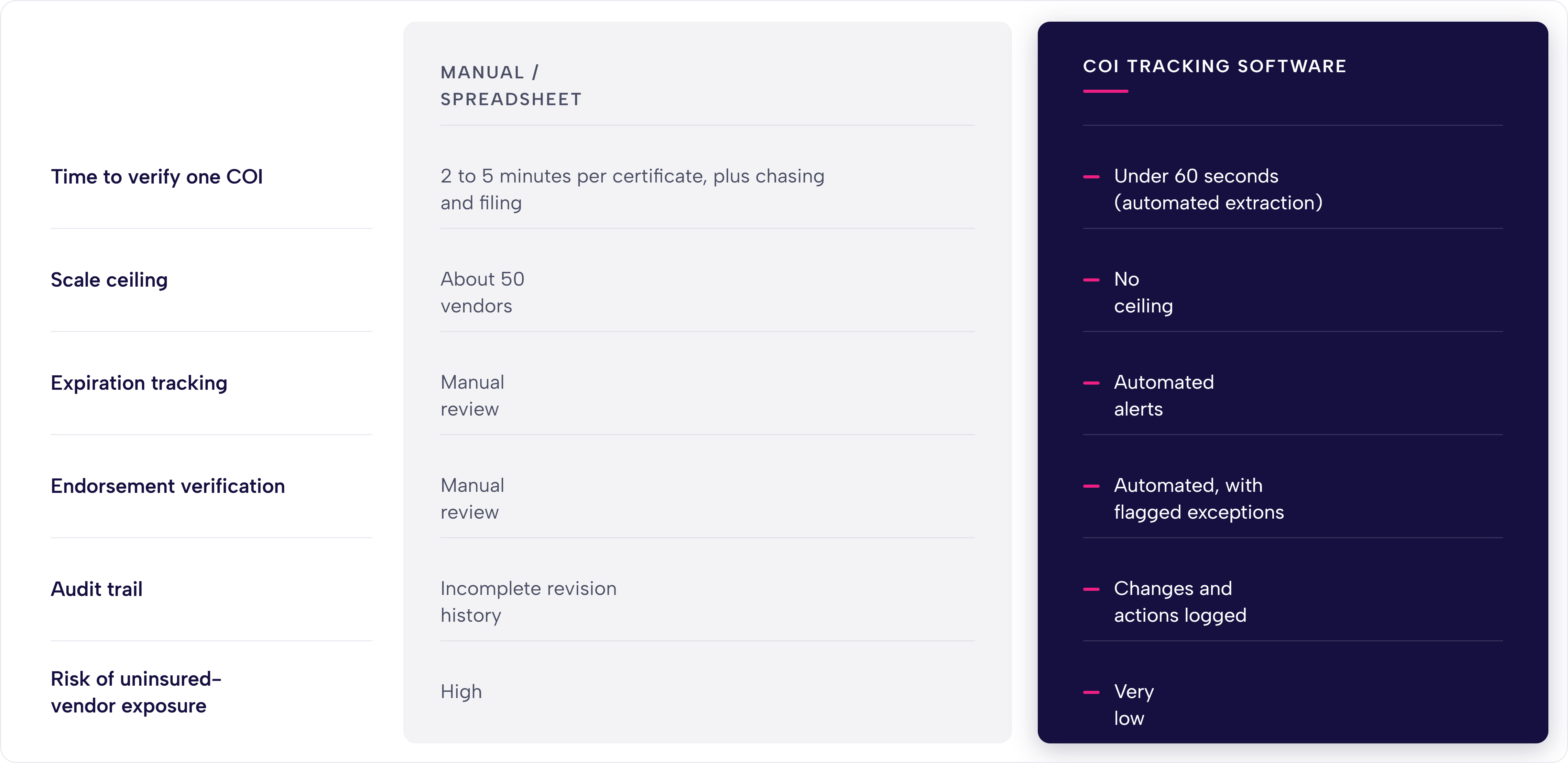
Most compliance teams start with a spreadsheet. The format is intuitive: one row per vendor, columns for carrier, policy number, effective date, expiration date, and a notes field for whatever else mattered last quarter. For a small vendor base, this works. The problem is what happens as the vendor count grows.
A spreadsheet does not chase expirations on its own. Someone has to scan the rows weekly, find the policies expiring soon, and start the email cycle to collect the renewed certificate. A spreadsheet does not verify that the new certificate actually contains the coverage specified in the contract; that requires a human reading the document. A spreadsheet does not confirm that the additional insured endorsement is attached, that the waiver of subrogation is in place, or that the policy limits match what the contract requires. Each of these verification steps is manual, repetitive, and error-prone.
By 50 vendors, most spreadsheet operations are spending 5 to 30 minutes on every certificate review, depending on the attached policy pages and endorsements and how many irrelevant documents the vendor sends, plus the chasing and filing around it. By 200 vendors, the time cost exceeds one full-time person. By 500 vendors, expirations start slipping unnoticed because there is no automated tripwire: the vendor lapses, the work continues, and exposure builds quietly until something visible happens.
COI tracking software automates the work spreadsheets cannot. Coverage data is extracted from each certificate by software trained on insurance documents. Expiration dates trigger automated reminders. Endorsement requirements are checked against contract terms. The audit trail records who uploaded each document, when, and what was verified. The cost per vendor for compliance management drops to a fraction of the manual rate. The exposure risk drops with it.
| Dimension | Manual / spreadsheet | COI tracking software |
|---|---|---|
| Time to verify one COI | 5 to 30 minutes per certificate (varies with attached policies and endorsements) , plus chasing and filing | Under 60 seconds (automated extraction) |
| Scale ceiling before error rate spikes | ~50 vendors | No ceiling (architecture-bound) |
| Expiration tracking | Manual review of every row | Automated alerts on expiry windows |
| Endorsement verification | Eye-check of attached forms | Automated, with flagged exceptions |
| Audit trail | Spreadsheet revision history (incomplete) | Immutable per-record log |
| Coverage of additional insured language | Manual reading per certificate | Automated language match |
| Renewal collection | Outbound email, sent manually | Automated request plus vendor portal |
| Risk of uninsured-vendor exposure | High (depends on diligence) | Near-zero (depends on configuration) |
For organizations tracking more than 50 vendors, software is not a productivity upgrade; it is the only path that keeps the compliance program intact. If your team would rather not run that software in-house, you can also have a compliance team run it for you.
How COI tracking works: the 5-step workflow
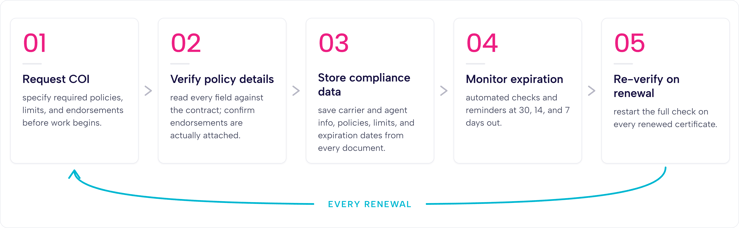
A complete COI tracking workflow has five steps: request at onboarding, verify policy details, store with metadata, monitor expiration, and re-verify on renewal.
Each step exists for a reason. Skipping any one of them creates a specific failure mode. Done in order, they form a closed loop that catches lapses before they become exposure.
Step 1: Request the COI at vendor onboarding
A complete request specifies the required policy types, coverage limits, and endorsements before any work begins, paired with a hard deadline for certificate submission. Done well, this step blocks every uninsured vendor from starting because contract leverage exists at onboarding and nowhere else in the lifecycle.
Step 2: Verify policy details
Verification means reading every field on the certificate (carrier, policy types, limits, dates, endorsement attachments) against the contract requirements and confirming the match document by document. Done well, this step catches the certificates that reference required endorsements without actually attaching them, the failure mode that produces the loudest claims-time surprises.
Step 3: Store the certificate data
Storage means extracting the certificate's structured data (carrier, policy numbers, dates, limits, endorsements, additional insured language) into searchable fields linked to the vendor record. Done well, this step makes the entire vendor portfolio queryable in seconds, surfacing every vendor expiring soon or missing a required endorsement on demand.
Step 4: Monitor expiration dates and send reminders
Monitoring means running automated checks against policy expiration dates and triggering vendor outreach 30, 14, and 7 days out so renewal certificates arrive before the current ones lapse. Done well, this step eliminates the most common COI tracking failure: coverage that quietly expired months ago because no one was watching the calendar.
Step 5: Collect renewed COIs and re-verify
When a renewed certificate arrives, the verification cycle restarts: every field rechecked against the same contract requirements, including any policy changes. Done well, this step closes the loop and prevents renewed certificates from accumulating in inboxes without re-verification, which silently recreates the spreadsheet failure mode inside the tool that is supposed to prevent it.
What to look for in COI tracking software
Effective COI tracking software automates four things (collection, verification, monitoring, and renewal) so compliance teams shift from chasing paper to managing exceptions.
Most platforms claim all four. The differences show up in how deep each one goes. Evaluate on four dimensions: verification depth, automation breadth, audit-trail integrity, and total cost of ownership.
Verification depth. The platform should read every field on the certificate (carrier, coverage types, policy limits, effective and expiration dates, additional insured language, endorsement attachments) and check each against your contract requirements. A tool that tracks only expiration dates is a calendar, not a compliance system. Ask specifically whether it confirms endorsements are attached, because that is where the costly gaps hide.
Automation breadth. Collection should run through a vendor portal where vendors upload certificates directly, not through your inbox. Monitoring should trigger automated reminders before policies expire, and renewals should re-enter the verification queue automatically. Every manual handoff the software removes is an error that can no longer happen. Confirm the platform integrates with the systems you already run; bcs integrates natively with Procore, MRI Software, Yardi, and Entrata.
Audit-trail integrity. The record of who uploaded each certificate, when, what was verified, and which endorsements were attached should be immutable once recorded. If a vendor's coverage is ever disputed after a loss, that record is your defense.
Total cost of ownership. Pricing in this category is often opaque and quote-gated. We publish ours: bcs (Business Credentialing Services), a certificate of insurance tracking and vendor compliance platform founded in 2008 and serving a vendor network of 98,000+, is free for up to 25 vendors, $0.95 per vendor per month for Self-Service, and $17.80 per vendor per year for Full-Service with a $10,000 annual minimum. Whatever platform you evaluate, get the per-vendor price in writing and confirm what verification work is included at that price.
ROI: time saved and risk eliminated
Organizations that move from spreadsheet-based to software-based COI tracking typically reduce vendor compliance management time by more than half and cut uninsured-vendor exposure to near zero.
The time math is simple to run on your own numbers. Manual review can take anywhere from 5 to 30 minutes per certificate, depending on the attached policy pages, endorsements, and how much irrelevant paperwork you have to sort through, and every certificate is touched at least twice a year: once at collection and once at renewal. At 200 vendors, that workload, plus the chasing, filing, and expiration scanning around it, exceeds a full-time person. Manual COI tracking costs an estimated $36,400 per year in direct labor for 100-plus vendors, and that is the minimum floor.
Software collapses that cost. Extraction reads the certificate in under a minute. Reminders go out without anyone scanning rows. Renewals queue themselves for re-verification. The compliance team stops touching every certificate and starts touching only the exceptions: the lapsed policy, the missing endorsement, the limit that no longer matches the contract.
The risk math is harder to see on a spreadsheet because the cost of a gap is zero until the day it is not. An uninsured vendor causes a loss, the contract clause points at coverage that lapsed four months ago, and the exposure lands on the hiring company. A single uncovered claim routinely exceeds what a tracked, verified vendor portfolio costs to run for years. Time saved is the visible return; the claim that never lands on your balance sheet is the larger one.
5 common COI tracking mistakes
Most COI tracking failures are not exotic. The same five mistakes account for nearly every uninsured-vendor surprise.
1. Treating collection as verification. A folder of stored certificates proves only that documents arrived, not that coverage matches the contract. Every certificate needs its fields read against requirements before the vendor starts work.
2. Tracking only expiration dates. A policy can be active and still non-compliant: limits below contract, wrong coverage type, missing endorsements. Expiration is one field of many that need monitoring.
3. Assuming the certificate proves additional insured status. A certificate that names you as additional insured is not proof the endorsement is attached to the policy. Require and verify the endorsement itself.
4. Letting renewals accumulate unverified. A renewed certificate that nobody re-verifies can carry changed limits or dropped endorsements straight past your controls. Every renewal restarts the full verification cycle.
5. Keeping no defensible audit trail. When coverage is disputed after a loss, "we checked it" is not a record. You need who uploaded each certificate, when, what was verified, and which endorsements were attached, immutable once recorded.
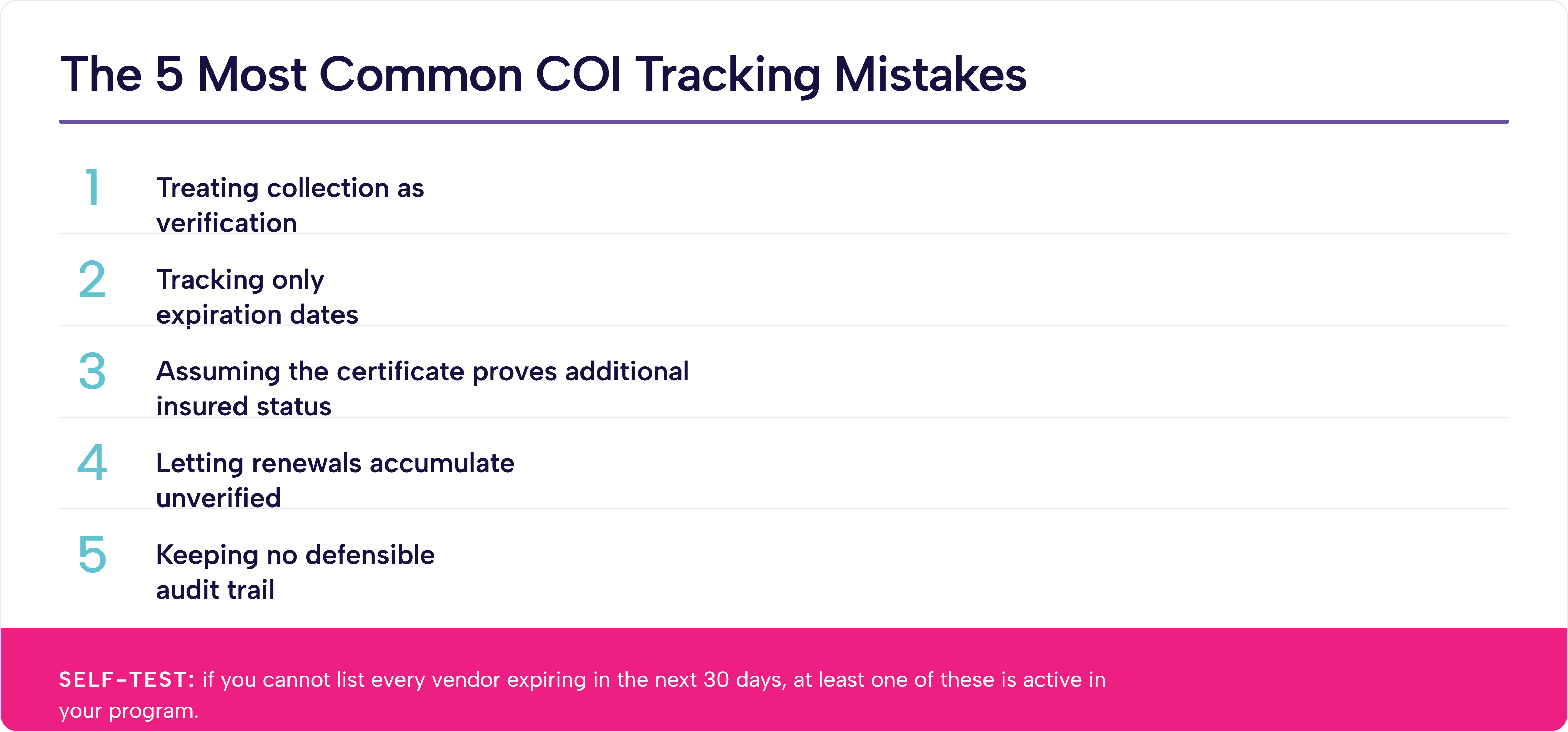
A simple self-test: if you cannot list every vendor expiring in the next 30 days in under a minute, at least one of these mistakes is active in your program.
Frequently asked questions
What is a certificate of insurance?
A certificate of insurance (COI) is a one-page summary of a vendor's active insurance coverage, most often issued on the standardized ACORD 25 form. It lists the carrier, policy types, coverage limits, and effective and expiration dates. A COI documents that coverage exists; it does not itself confer coverage. For the full breakdown, see the bcs certificate of insurance guide.
Why do companies need to track certificates of insurance?
Companies track certificates of insurance to confirm every vendor's coverage stays active and contract-compliant for the full duration of the work. A contract clause requiring insurance is only enforceable after a loss; COI tracking is what makes that clause real before a loss. Untracked vendors create uninsured-vendor exposure that lands on the hiring company.
What is the difference between COI tracking and vendor compliance?
COI tracking is a subset of vendor compliance. COI tracking covers collecting, verifying, and monitoring insurance certificates. Vendor compliance is the broader lifecycle: insurance plus W-9s, licenses, certifications, and contractual requirements across the full vendor relationship. A vendor can hold a valid COI and still be non-compliant on other requirements.
How often should certificates of insurance be reviewed?
Reviewing a certificate of insurance is an ongoing task. You will have to review a vendor's COI at all of the following moments: during onboarding, during each policy renewal, if there is a change of scope of work, and if there is any cancellation or policy change notice from the vendor's agent.
Can I track COIs in a spreadsheet?
Yes for a small vendor base, no at scale. Manual COI tracking creates measurable risk because expiration tracking and endorsement verification cannot scale past roughly 50 vendors without errors that produce uninsured-vendor exposure. A spreadsheet does not chase renewals, verify endorsements, or alert you before a policy lapses.
What does COI tracking software automate?
Effective COI tracking software automates four things: collection, verification, monitoring, and renewal. It gathers certificates from vendors, extracts and checks coverage against your requirements, sends automated reminders before policies expire, and re-verifies renewed certificates. That shift lets compliance teams move from chasing paper to managing exceptions.
What is an additional insured, and why does COI tracking care?
An additional insured is a party added to a vendor's policy by endorsement so the vendor's coverage extends to them. A certificate naming you as additional insured is not proof the endorsement is attached. Verifying a certificate of insurance means confirming carrier, coverage type, policy limits, effective and expiration dates, additional insured language, and required endorsements, not simply storing the document.
How do I choose COI tracking software?
Evaluate four dimensions: verification depth, automation breadth, audit-trail integrity, and total cost of ownership. A defensible COI audit trail records who uploaded each certificate, when, what was verified, and which endorsements were attached, and it is immutable once recorded. Confirm the platform checks endorsements against contract terms, not only expiration dates.
COI tracking is the difference between a contract clause and actual protection. If you are tracking more than 50 vendors in a spreadsheet, the gaps are already there; you just haven't found them yet. see how bcs automates this, free for up to 25 vendors, or explore how we approach vendor compliance management more broadly.